
IMPORTANT: While we do our best to support you via email, submitting a cancellation request by email or any other support channel does not guarantee your subscription will be canceled in time. Emails can be missed, flagged as spam, or delayed. To avoid unwanted charges, please follow the simple cancellation instructions below, which are the only way to ensure your request is processed correctly and on time.
Deleting your location, company, or profile is NOT the same as cancelling your account.
Click on the gear icon in the top right hand side of your screen then MANAGE BILLING
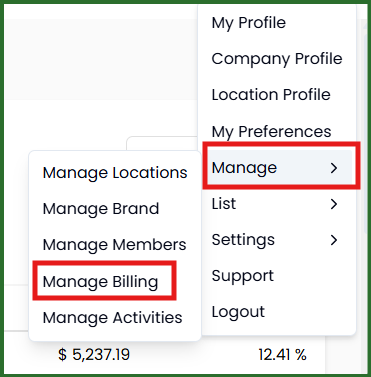
Click on the WANT TO CANCEL link.

You will retain access to your account until the end of your billing cycle and your account will remain in our database for 30 days in the event you change your mind and want to restart your account. We are unable to export data so please be sure that you have downloaded any reports you wish to keep.
If you have multiple locations you wish to cancel, follow the same steps for each location.
To Cancel a Partner Billed Location
From your Partner Dashboard, click on the billing tab and search for the location you wish to cancel. Click the 3 dots next to the location name and then choose "Remove from Partner". The account will automatically be removed from your Partnership immediately and trigger an email to both the member and the Partner Admins. To ensure you are not billed for an additional month, be sure to remove the account from your partnership by the end of the month.